LilyGO T-Deck
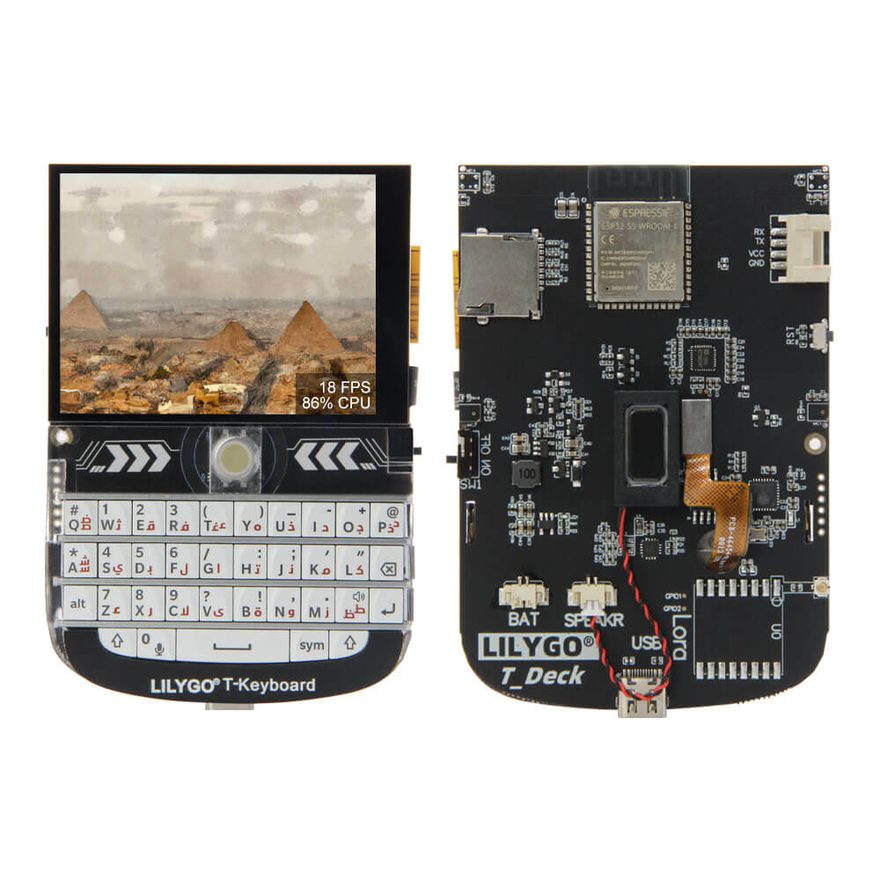
The first board here that is a terminal rather than a gateway: it has keys to type a message on, so the LVGL shell's on-glass keyboard steps aside and the field takes the real ones. Three firsts, each of which cost more than the pin map. The panel, the radio and the card share one SPI bus, which is safe — the Arduino core's per-bus mutex is what beginTransaction takes, and no driver here attaches a hardware chip select — but needs every select idled before any driver starts, because the first one to talk otherwise does so beside two floating selects (src/sys/BoardInit.cpp). Nothing on the board answers until the peripheral rail on GPIO 10 is raised, and an unraised rail reads exactly like a wiring fault: empty bus, absent transceiver. And the backlight is a one-wire dimmer whose brightness is a pulse count rather than a duty cycle, so the PWM every other board uses lands on whatever level the wrap leaves — lit, but not dimmable. The pin map is the best-sourced in this registry: LilyGO's own reference firmware and the Meshtastic, MeshCore and Zephyr ports agree on every number. Native USB, same composite stack as the T3-S3s.
01 Hardware
| Vendor | LilyGO |
| PlatformIO env | t-deck |
| Board header | src/boards/tdeck.h |
| MCU | ESP32-S3: 16 MB flash, 8 MB octal PSRAM in package |
| Chip family | ESP32-S3 |
| Radio | SX1262 (TCXO at 1.8 V, DIO2 drives the RF switch), no amplifier |
| Display | 2.8" 320x240 ST7789 with a GT911 touch layer |
| Extras | physical keyboard on its own microcontroller (I2C), trackball with a click on the BOOT pin, microSD, battery ADC, speaker on a MAX98357A over I2S (driven: the boot and message chimes), microphone on an ES7210 (not driven — it costs GPIO 0, which is the trackball's click); GNSS on the Plus only |
| Host links | Wi-Fi access point + station · USB CDC-NCM Ethernet · native USB console |
| Flashing | esptool can reset the chip through this port |
02 Radio
| Transceiver | Semtech SX1262 |
| Radio family | SX126x |
| As the registry states it | SX1262 (TCXO at 1.8 V, DIO2 drives the RF switch), no amplifier |
| TCXO | 1.8 V reference |
| DIO2 drives the RF switch | yes |
| Default channel | 869.525 MHz · BW 125 kHz · SF8 · CR 4/5 · 7 dBm inherited from Config.h |
| SPI bus | FSPI — shared with the panel and the card slot |
Every node on a channel must agree on frequency, bandwidth, spreading factor,
coding rate and sync word. These are the defaults this build ships with; they are changed
live on the node's settings page, which prints the matching RNodeInterface block.
03 Pin map
Read straight out of src/boards/tdeck.h — every peripheral
the firmware drives on this board, and the GPIO it drives it on. A harness diagram, not a
picture of where the parts sit.
Every pin as a table, with the define it comes from
| Peripheral | Signal | GPIO | Define | Note |
|---|---|---|---|---|
| Radio | SCK | GPIO 40 | PIN_LORA_SCK | |
| MISO | GPIO 38 | PIN_LORA_MISO | ||
| MOSI | GPIO 41 | PIN_LORA_MOSI | ||
| CS | GPIO 9 | PIN_LORA_CS | ||
| RST | GPIO 17 | PIN_LORA_RST | ||
| BUSY | GPIO 13 | PIN_LORA_BUSY | ||
| DIO1 | GPIO 45 | PIN_LORA_DIO1 | ||
| TFT panel | SCK | GPIO 40 | PIN_TFT_SCK | |
| MOSI | GPIO 41 | PIN_TFT_MOSI | ||
| MISO | GPIO 38 | PIN_TFT_MISO | ||
| CS | GPIO 12 | PIN_TFT_CS | ||
| DC | GPIO 11 | PIN_TFT_DC | ||
| BL | GPIO 42 | PIN_TFT_BL | ||
| Touch layer | SDA | GPIO 18 | PIN_TOUCH_SDA | |
| SCL | GPIO 8 | PIN_TOUCH_SCL | ||
| INT | GPIO 16 | PIN_TOUCH_INT | ||
| Keyboard | SDA | GPIO 18 | PIN_KEYPAD_SDA | |
| SCL | GPIO 8 | PIN_KEYPAD_SCL | ||
| Trackball | UP | GPIO 3 | PIN_TRACKBALL_UP | |
| DOWN | GPIO 15 | PIN_TRACKBALL_DOWN | ||
| LEFT | GPIO 1 | PIN_TRACKBALL_LEFT | ||
| RIGHT | GPIO 2 | PIN_TRACKBALL_RIGHT | ||
| microSD | SCK | GPIO 40 | PIN_SD_SCK | |
| MISO | GPIO 38 | PIN_SD_MISO | ||
| MOSI | GPIO 41 | PIN_SD_MOSI | ||
| CS | GPIO 39 | PIN_SD_CS | ||
| GNSS | RX | GPIO 44 | PIN_GPS_RX | |
| TX | GPIO 43 | PIN_GPS_TX | ||
| I²C bus | SDA | GPIO 18 | PIN_I2C_SDA | |
| SCL | GPIO 8 | PIN_I2C_SCL | ||
| Audio (I²S) | BCLK | GPIO 7 | PIN_I2S_BCLK | |
| LRCLK | GPIO 5 | PIN_I2S_LRCLK | ||
| DOUT | GPIO 6 | PIN_I2S_DOUT | ||
| Power | BOARD | GPIO 10 | PIN_BOARD_POWER | |
| VBAT | GPIO 4 | PIN_BATTERY_ADC | ||
| Controls & indicators | BTN | GPIO 0 | PIN_BUTTON | BOOT, and the trackball's click |
04 Firmware support
What this build actually drives on this board. Where a part is fitted but left alone, the firmware's own reason is quoted underneath rather than summarised.
| Capability | State | Detail |
|---|---|---|
| Reticulum transport | driven | Path table, announce propagation, hop-by-hop forwarding |
| Wi-Fi AP + captive portal | driven | Status page, neighbours, bulletin board, settings |
| TCP 4242 + AutoInterface | driven | Stock RNS clients, zero-config discovery |
| LoRa radio | driven | Semtech SX1262 |
| Radio self-test at boot | no | Proves the IRQ line on first boot |
| RF front end | no | Driven before the radio can hear anything |
| External PA | not driven | — A bare switch and no amplifier: what the chip is driven at is what leaves the antenna, less the usual losses |
| Display | driven | TFT · 240×320 The glass is landscape 320x240 and the controller is portrait 240x320; the shell turns it in the controller's own MADCTL, which costs nothing per pixel. DISPLAY_WIDTH/HEIGHT are the controller's, as TftPanel expects |
| Backlight control | driven | AW9364 charge pump The backlight is not an LED on a PWM pin. GPIO 42 drives an AW9364 one-wire dimmer, whose brightness is a counter inside the part: holding the line high turns it on at full, and each further low-high pulse steps it down one of sixteen levels, wrapping round at the bottom. Driving it with a PWM channel — which is what the other colour board here does, and what one of the two reference firmwares for this board does — sends the part twenty thousand step pulses a second and lands on whatever level the wrap happens to leave. It lights, which is why it passes for working; it is not a dimmer. So this board asks for the part's own protocol instead. See TftPanel.cpp |
| Touch layer | driven | GT911 Unlike the Heltec V4's touch layer this one has no bus to itself: the controller and the keyboard share SDA 18 / SCL 8. TouchInput sees that the pins match the main bus and uses Wire rather than standing up a second one |
| Keyboard | driven | On its own microcontroller, over I²C The keyboard is not a matrix this firmware scans: a second microcontroller scans it and hands over one ASCII byte per keypress on request. See src/ui/Keypad.h for what that protocol is and is not |
| Trackball | driven | — Active low, one falling edge per detent. The press is the BOOT pin, which is also this board's only button, so PIN_BUTTON below is the same pin: a click of the ball is a press of the button, and the page stack and the shell both already know what to do with that |
| microSD | driven | Reticulum store moves onto the card when one is present |
| GNSS | driven | 38400 baud The Plus fits a receiver on GPIO 43/44; the plain T-Deck runs those pins out to the Grove connector and fits nothing. Both are this one env, and it assumes the receiver is there — the same call this project already made for the Heltec V4's expansion kit, and for the same reason: the bench unit is a Plus, and a board without one loses nothing but a UART nobody is talking on. A plain T-Deck reports a receiver that never sends a sentence, which the GPS page states plainly rather than hiding. Worth knowing on a Plus: the Grove connector is still on the case but its pins are the ones the receiver took, so it is not usable as an expansion port on this variant |
| Real-time clock | no | Seeds the system clock at boot |
| Power management IC | no | — |
| Battery gauge | driven | — A plain 100k/100k divider on GPIO 4, always connected — no enable line to raise, unlike the Heltec V4's. The ratio here is the divider's own; the Meshtastic variant carries 2.11 instead, which is that ratio with an empirical trim for their reader. Ours is a different reader, so it starts from the circuit and is corrected against a meter if the bench disagrees |
| IMU | no | — |
| Magnetometer | no | — |
| Environment sensor | no | — |
| Sounder | driven | — A speaker rather than a piezo: a MAX98357A on I2S, confirmed from LilyGO's schematic — the wiki lists only the ES7210 microphone and omits the amplifier entirely. Its gain pin is strapped to ground and it has no control bus, so there is nothing to configure: samples on these three pins are the whole interface. Costs a task and a buffer, which the piezo boards do not pay. The ES7210 beside it is a microphone ADC and is not driven. Worth knowing before anyone reaches for it: enabling that part spends GPIO 0, which is this board's trackball click |
| USB networking (CDC-NCM) | driven | The node is an Ethernet link with DHCP over the cable |
| PPP over the serial bridge | no | — |
05 Bench notes
verified on hardware: SX1262 on air (receiving announces from another node), Reticulum transport, panel with correct colours and text, its stepped backlight, touch landing where the finger is, keyboard, trackball, microSD on the shared bus, GNSS fix and clock, Wi-Fi AP, portal and console, and the speaker — the boot chime was heard on the bench. The speaker costs about 5.4 KB of internal RAM for its task and I2S DMA, on a board that has little to spare, and its task now carries the tightest stack of any on the board.
This is a Plus — a plain T-Deck has neither the receiver nor the touch layer. The battery divider reads the system rail on USB and so reports no cell; unverified on battery.
06 Install
Browser
Pick LilyGO T-Deck in the web flasher and click Install. Desktop Chrome or Edge, over HTTPS.
Terminal
pipx run --spec "git+https://github.com/dobrevit/RetiMesh_Node#subdirectory=tools/retimesh-flash" \
  retimesh-flash install --board t-deck
From source
pio run -e t-deck
pio run -e t-deck -t upload
pio run -e t-deck -t uploadfs